The idea of paging is to eliminate External Fragmentation by storing the memory footprint of a process in discontinuous memory locations called Pages.
However, it has Internal Fragmentation because a process will almost always not utilize 100% of its allocated page.
Then the Memory Broker can handle maintaining semantics, while enforcing this scheme.
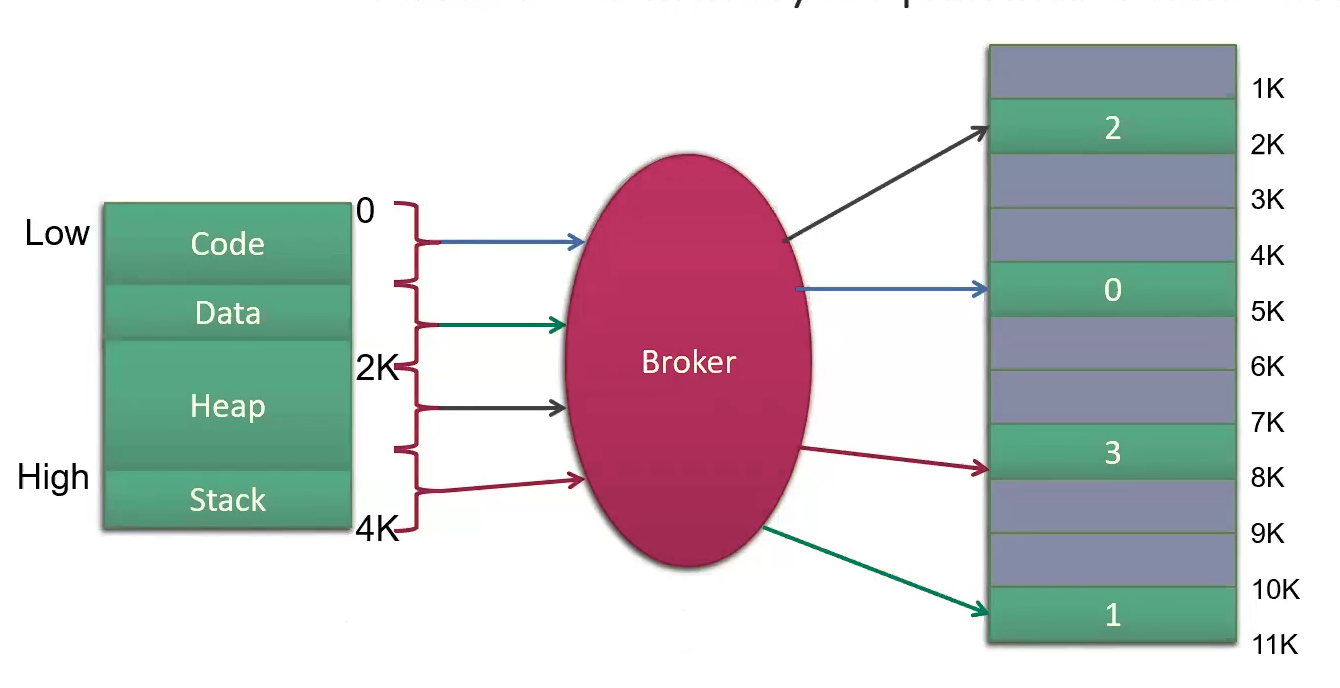
Page
Memory block used in paging.
All Memory is divided into pages
Virtual Page
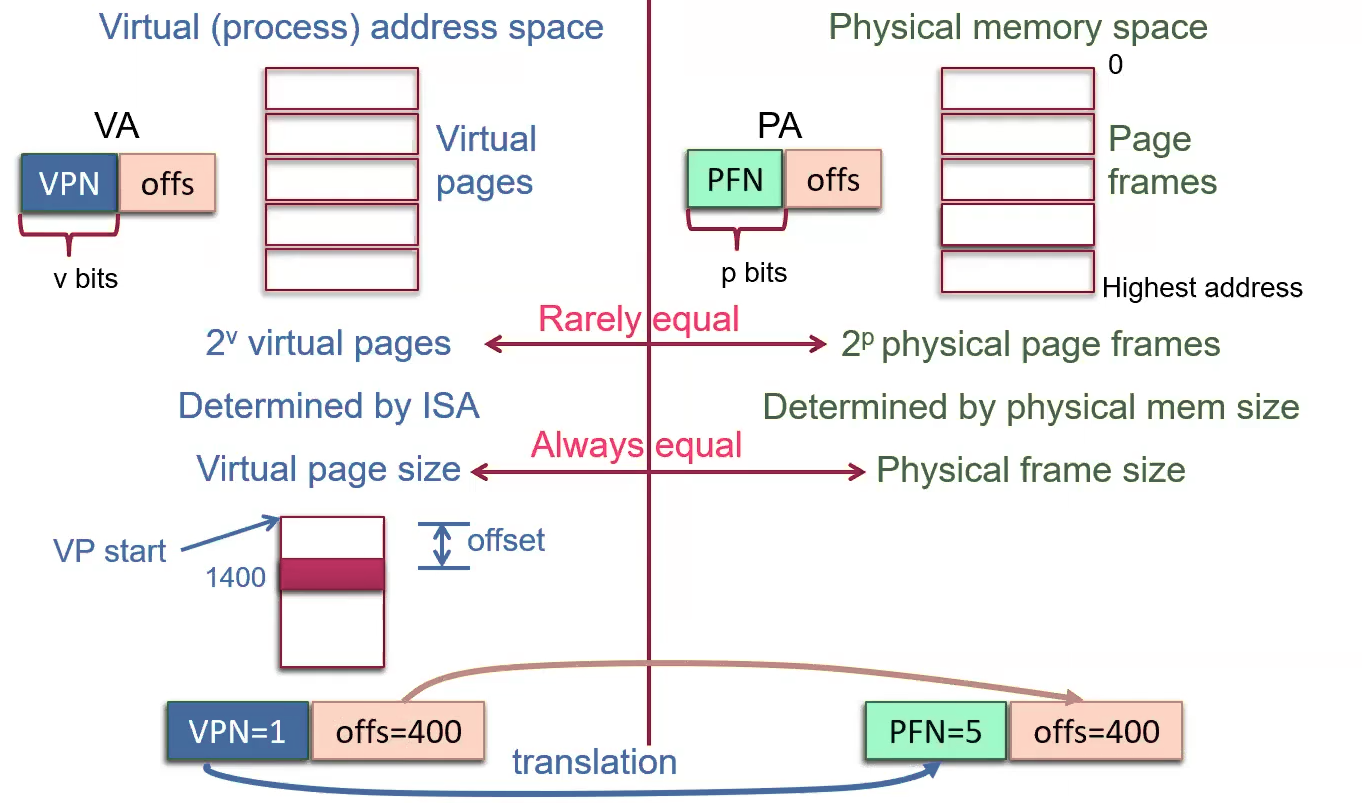
Virtual page is a fixed-length block of Virtual Memory that is mapped to Physical Addresses
Page Frame
A page frame refers to a contiguous block of memory that corresponds to actual storage locations in Memory
Page Size
Bigger pages yield more Internal Fragmentation Smaller pages get us a bigger page table and take more CPU time to manage
-
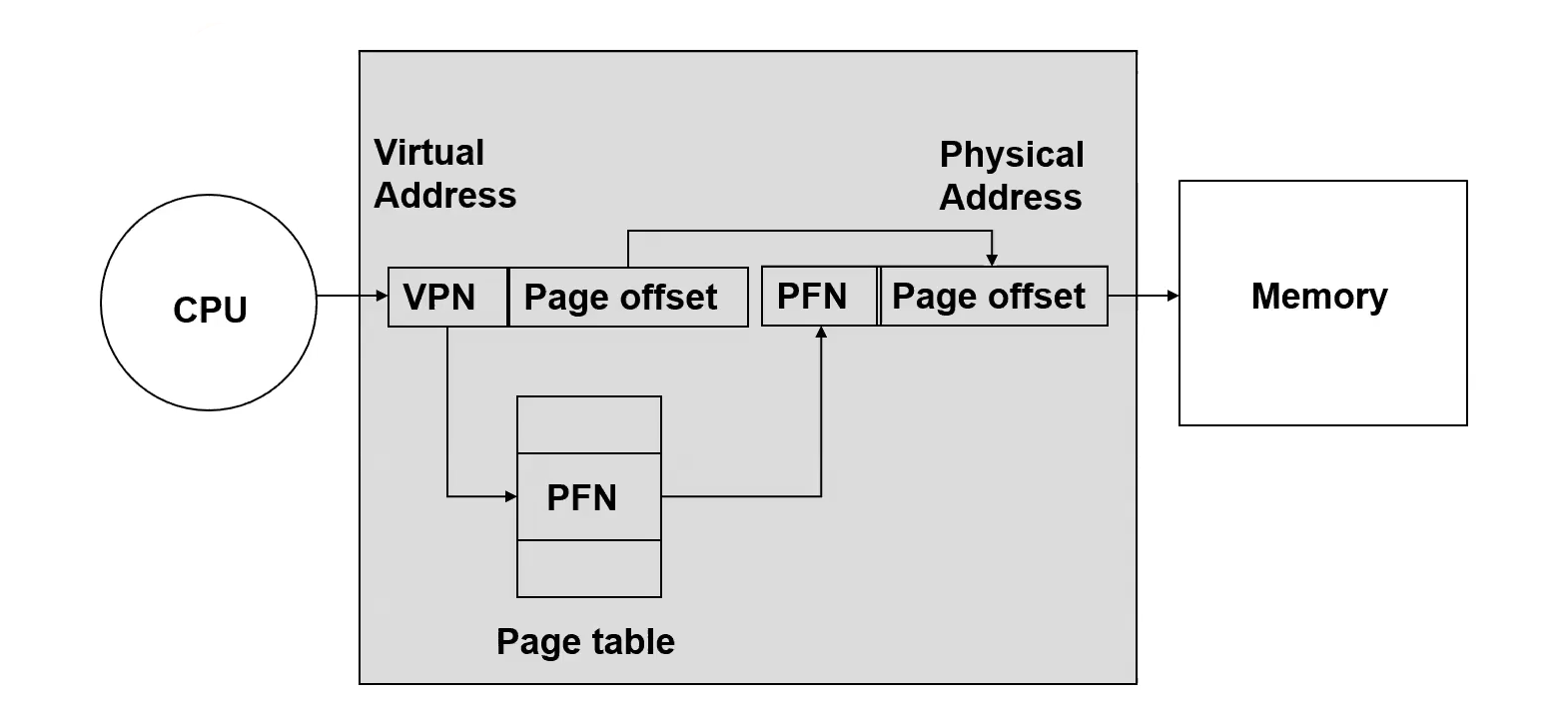
Using a power of 2 allows us to split the virtual address into a Virtual Page Number and Offset within the page at a bit boundary, without using extra logic
-
If the page size is
, the lower bits are the offset and bit and up are the virtual page number e.g. with a 4 kilobyte ( bit) page size and a 32 bit virtual address space 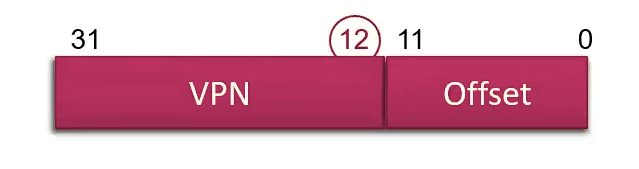
-
Page frames =
-
Table entries =
e.g. 4 KB page size, 32 bit virtual addresses, 24 bit physical addresses
e.g. You have a memory system with 16-bit virtual and physical addresses and a 1K page size. The entries in the current page table are 0x14, 0x18, 0x08, 0x01. What is the physical address that virtual address 0x4ED maps to?
Remember: 6 VPN, 10 offset bits Virtual addr = 0x4ED (000001 | 0011101101) VPN=0x01, Offset=0x0ED PFN=0x18, Offset=0x0ED (011000 | 0011101101) (0110 0000 1110 1101) Physical addr = 0x60ED
PFN
Page Frame Number. Indexes Page Frames.
VPN
Virtual Page Number. Indexes Virtual Pages
Page Coloring
Page Coloring
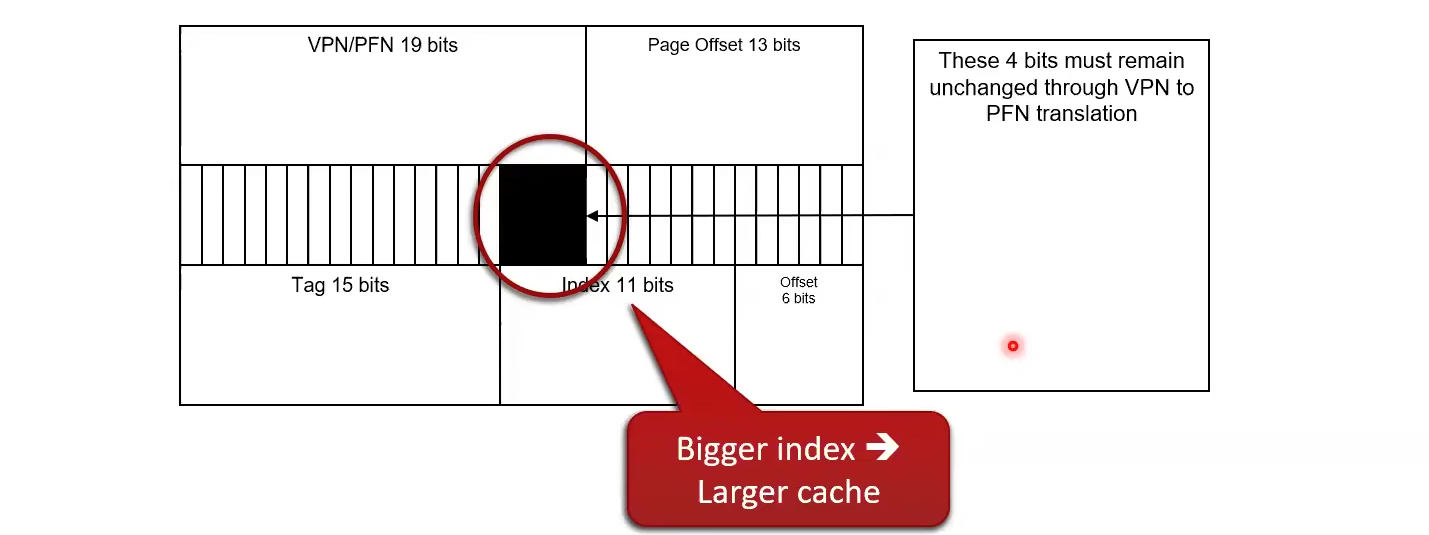
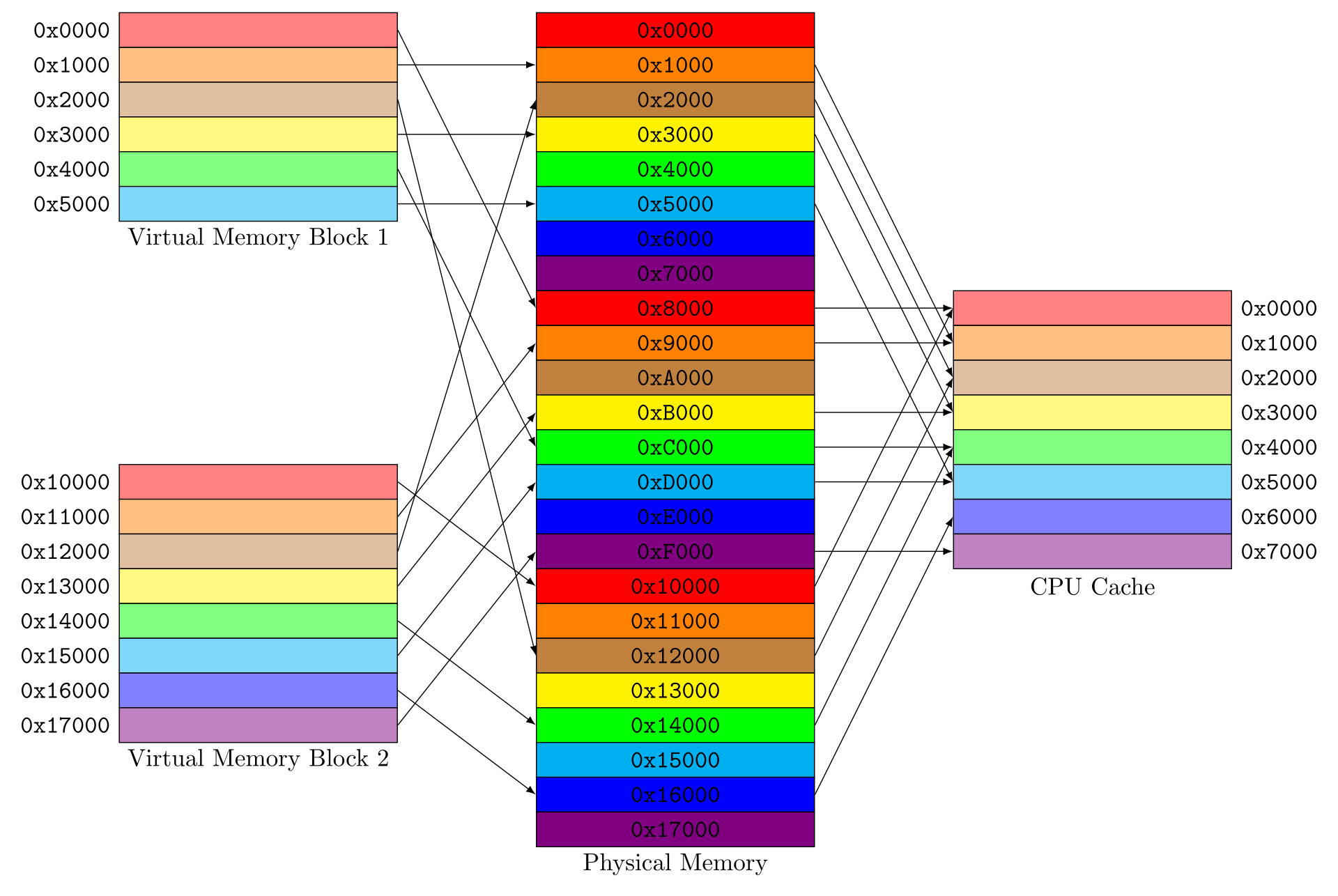
The OS guarantees that some bit of the VPN will remain unchanged through address translation, i.e. the low bits of the VPN and PFN are identical The low bits are like a color. The color of the virtual address must match the color of the physical address. This means that a virtual page can only occupy a subset of page frames in which the low bits of the VPN match the low bits of the PFN. Page Replacement Algorithms has to keep track of this. It could be harded to fit a working set into physical memmory, but it’s often fine because processes tend to use continguous pages, so the VPNs of the pages are spread evenly amoung the colors. (VPN and PFN happen to be the same size here)
Example
Link to originalsize(Colored Bits)
- 64-bit virtual address
- 32-bit physical address
- Virtually-indexed, physically-tagged, 4-way set associative cache
- Page size of 4 KB
- Memory is byte-addressable
- Total cache size of 512 KB
- Cache block size of 64 bytes
How many of the least significant bits of the VPN must remain unchanged in the VPN-PFN translation?
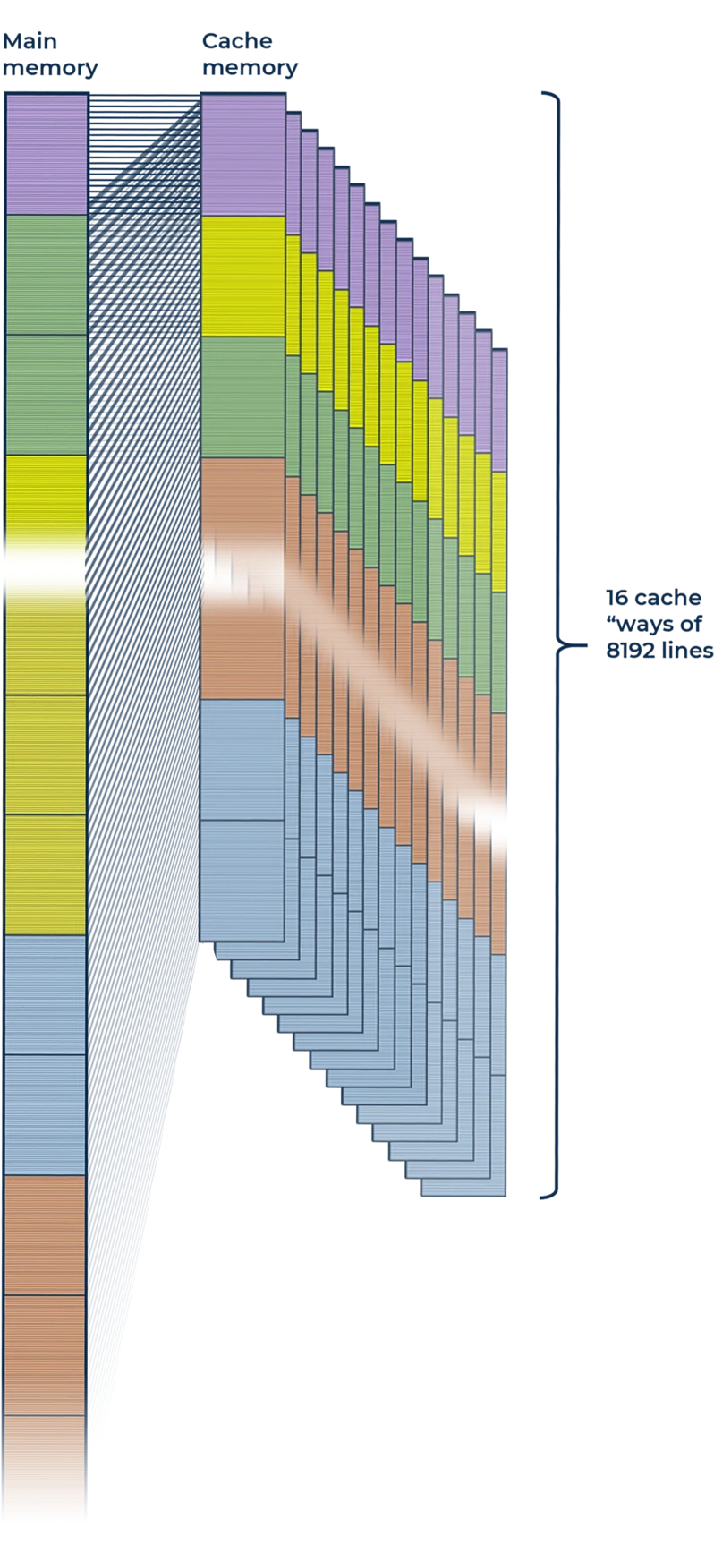
If you look at the above figures,
Page Table
Page Table
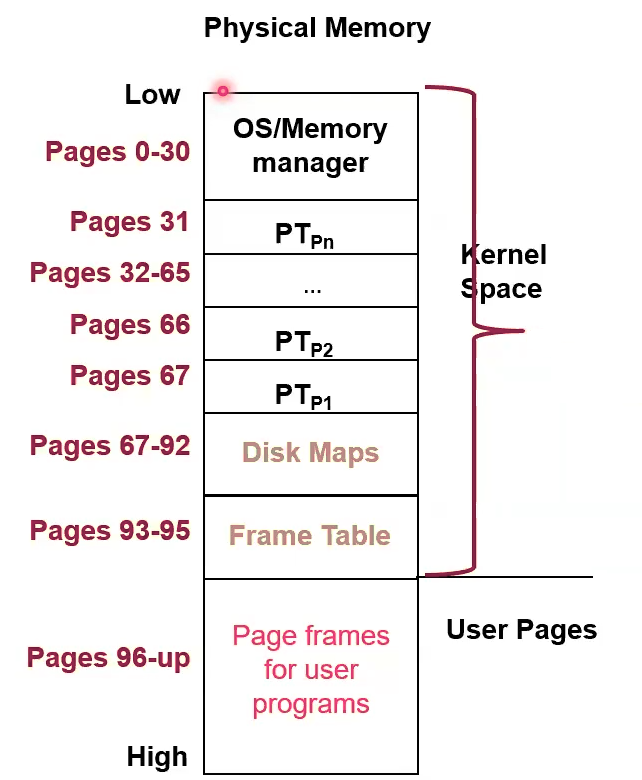
A Map from Virtual Address to Physical Address of Pages, used by the Memory Broker
Processes requires Page Tables Where page tables live in memory: 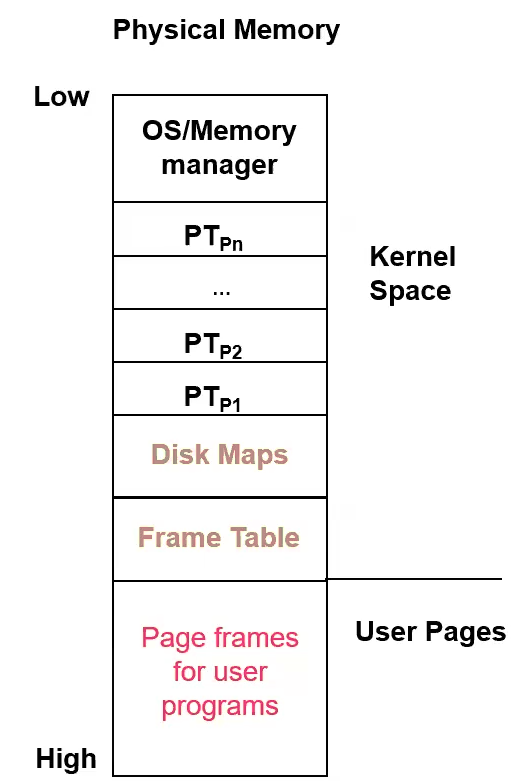
PTBR
PTBR holds the base Physical Address of the current proccess’ page table
- Put this value in the PCB
Demand Paging
Link to original
If the Broker tries to access a Page that is not valid, it will throw a Page Fault
Broker
Page Fault
Page Fault
An exception (/trap/interrupt) that the Memory Broker raises when a process tries to access a Virtual Address whose Page Frame is not currently resident in Physical Memory, in Demand Paging.
Invokes Replacement Algorithm to get space for the page it tried to access.
Many many page faults per second don’t neccessarily indicate Thrashing; thrashing implies too many page faults, but too many page faults don’t always imply thrashing. Applications can be changing the page in use without changing their Working Set size for instance. Rather you’d look for Memory Pressure being greater than the number of available page frames, high paging rate, low CPU utilization, unresponsive paging I/O
Page faults are very disruptive, and should therefore be limited as much as possible
- From a Process point of view
- implicit I/O
- From a CPU Utilization perspective
- Overhead that doesn’t contribute to work
Pipeline
- IF can cause page faults. After this we have to let the Pipeline drain. This is slow
- MEM can cause page faults, flush all previous stages including MEM
Page Fault Handler
- Find free Page Frame
- Load the faulting Virtual Page from disk into the page frame (slow)
- Done through Disk Map
- Give up the CPU while waiting for the paging I/O to complete
- Update the Page Table entry of the faulting page
- Link the PCB of the Process back in the Ready Queue of the Scheduler
- Call the Scheduler
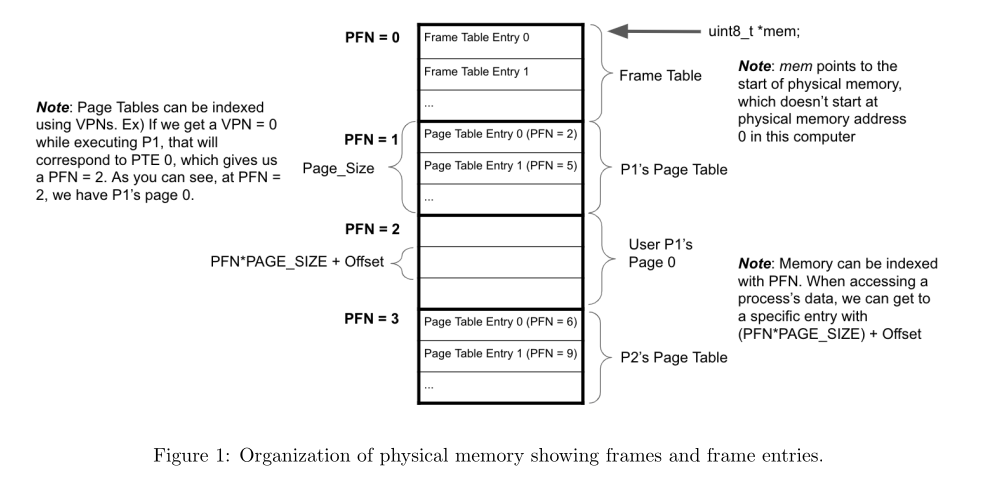
A Freelist can be used to link free Frame Table entries together
Possible metadata in C for a frame
Link to originalunion pframe { struct { char state; address PFN; PCB *PID; } filled; struct { char state; union pframe *next; } empty; };
Paging Optimization
kswapd
Link to original
- Proactively manages memory such that a (small) pool of Page Frames are always free for use (~2% of memory), meaning that if it does its job effectively, Processes never have to wait for Replacement Algorithm
- Memory usage will gradually accumulate over time, as any process that needs memory will be supplied it, until eventually it reaches a steady state of ~2% free, maintained by the intermittent management of kswapd
- If you run a program multiple times, its pages are already in memory, so it doesn’t have to refetch them
- If you open a file, its pages remain in memory, so they don’t have to be refetched
- Basically this behavior creates Caching behavior
- When kswap is running
- If a page is Dirty, write it out to disk to clean it.
- Uses a modified version of Second Chance for page eviction
- Evicts pages